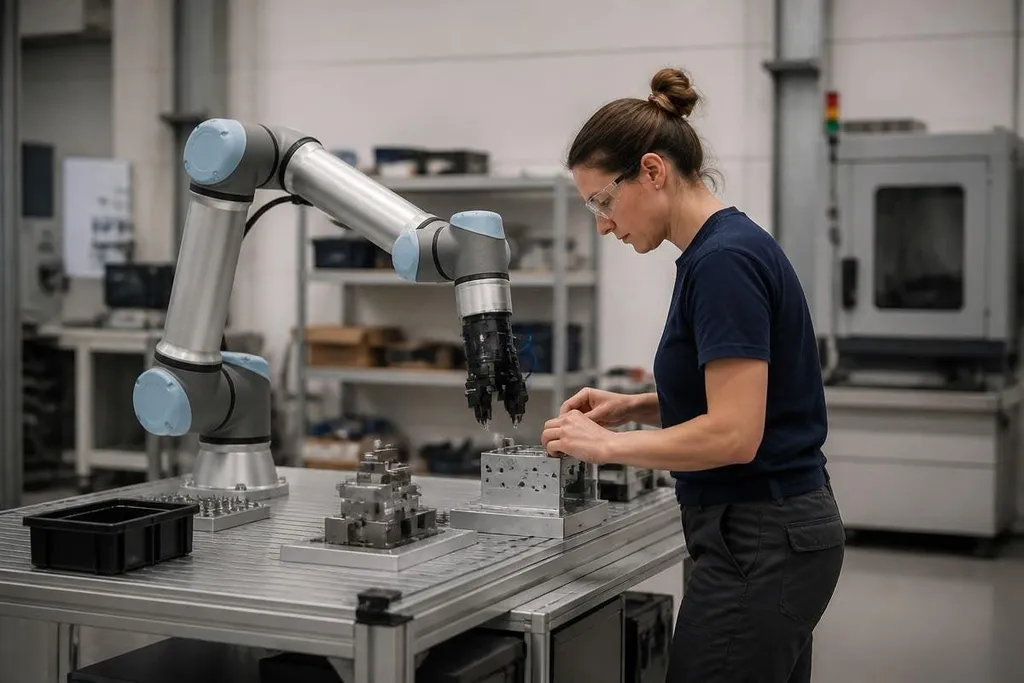
A collaborative robot, or cobot, works near people instead of sitting behind a fixed safety fence. That shared space can reduce manual strain and save floor area, but it doesn’t remove the need for a proper risk check.
- Cobots fit tasks that need people and machines at the same station.
- Force limits reduce some hazards, but the tool and workpiece still matter.
- A safety review should come before buying or installing one.
Where cobots help
Cobots suit work that repeats but still needs a person nearby. A robot can hold a part while a technician fastens it, load a small machine, apply adhesive, or move items between stations. The person handles checks and decisions while the robot repeats the set motion.
That setup can reduce bending, reaching, and lifting. It can also let one worker oversee a task without walking to a separate robot cell each time. The gain depends on the job: a cobot with a short reach or low payload won’t help much if parts arrive in large bins across the room.
Cobots can also move between tasks more easily than a fixed automation cell. A technician can change the gripper, update the program, and adjust the work area. That does not make every change quick. New parts still need testing, and the robot may need a fresh safety review when its motion, tool, or speed changes.
Why shared work can be useful
A fixed robot often needs a guarded cell with doors, scanners, or light curtains. A cobot may work without the same physical barrier when the complete application passes its safety checks. That can leave more room for people and materials, especially in a small production area.
The word “application” matters here. The robot arm is only one part of the system. The end effector, or tool on the arm, can create a hazard that the arm itself does not. A sharp cutter, hot tool, vacuum cup, or heavy part changes the risk level.
A cobot’s safety claim only makes sense beside the tool, part, and work cell it handles. Reporting at Robot 24 can place that claim beside the named task and setup, so you can judge the risk around the arm as well as the arm itself.
The risks people miss
Contact sensing can stop a cobot when it detects contact, but that feature has limits. A moving arm can pinch a hand against a table, trap clothing, or hit someone before the stop takes effect. A slow speed lowers the force and impact, yet it doesn’t make every movement safe.
The workpiece can create the larger hazard. A robot carrying a metal part may have more force at the point of contact than the bare arm. A gripper can drop a load, lose suction, or close on a finger. A nearby conveyor can keep moving after the robot stops, which is why the whole station needs review.
Programming errors bring another risk. A changed waypoint can send the arm into a fixture or across a person’s normal path. Restart behavior matters too. After a stop or power loss, the system should make its state clear and prevent an unexpected movement.
There are business risks as well. A cobot still needs setup, training, maintenance, spare parts, and time for fault finding. If the task changes often, the robot may spend more time waiting for changes than doing useful work. A purchase price alone won’t show that cost.
A safer buying decision
Use this checklist before you approve a cobot project:
- Name the task: record the part weight, cycle, reach, tool, and handoff points.
- Check the workspace: mark pinch points, walkways, conveyors, sharp edges, and hot surfaces.
- Test the full load: include the gripper and workpiece, not the arm alone.
- Review stop behavior: check what happens after contact, an emergency stop, and power loss.
- Assign ownership: name the people who will program, inspect, and maintain the station.
- Measure the work: compare useful robot time with setup, waiting, and fault-recovery time.
I'd choose a cobot when the task changes often and a person already needs to work at the same station. For a fast cycle, heavy load, sharp tool, or crowded walkway, a guarded industrial robot may be the safer choice.
The next step is a task trial with the real gripper, part, table, and operator. If the system cannot pass that test with clear stop behavior, the project needs a different layout or a different robot.